Draft ready. Nothing is sent until you approve.

Sample data

Weekly report: Sample Freight Ltd

Week 42 · 7 items this week: 4 done, 3 waiting on you or the line.

Done

  • Customs hold cleared; documents re-sent on Tuesday.
  • Invoice mismatch corrected and closed.
  • Bill of lading draft approved.
  • Reefer temperature alarm checked: false alarm.

Waiting

  • Vessel running two days late; new ETA confirmed Monday.
  • Delivery order still due from the shipping line.
  • Your KYC documents, please, by Wednesday.
Get your
Fridays back.

The scene above is scripted with sample data. No AI runs on this page, and nothing you click is sent anywhere.

We turn the admin your team repeats every week (client reports, ticket follow-ups, document updates, routine replies) into an AI workflow that drafts the work and waits for a person to approve it.

Book a free 20-minute call

The same three jobs, every week.

None of it is difficult. It’s the same report, chaser and document, redone every week by someone with better things to do.

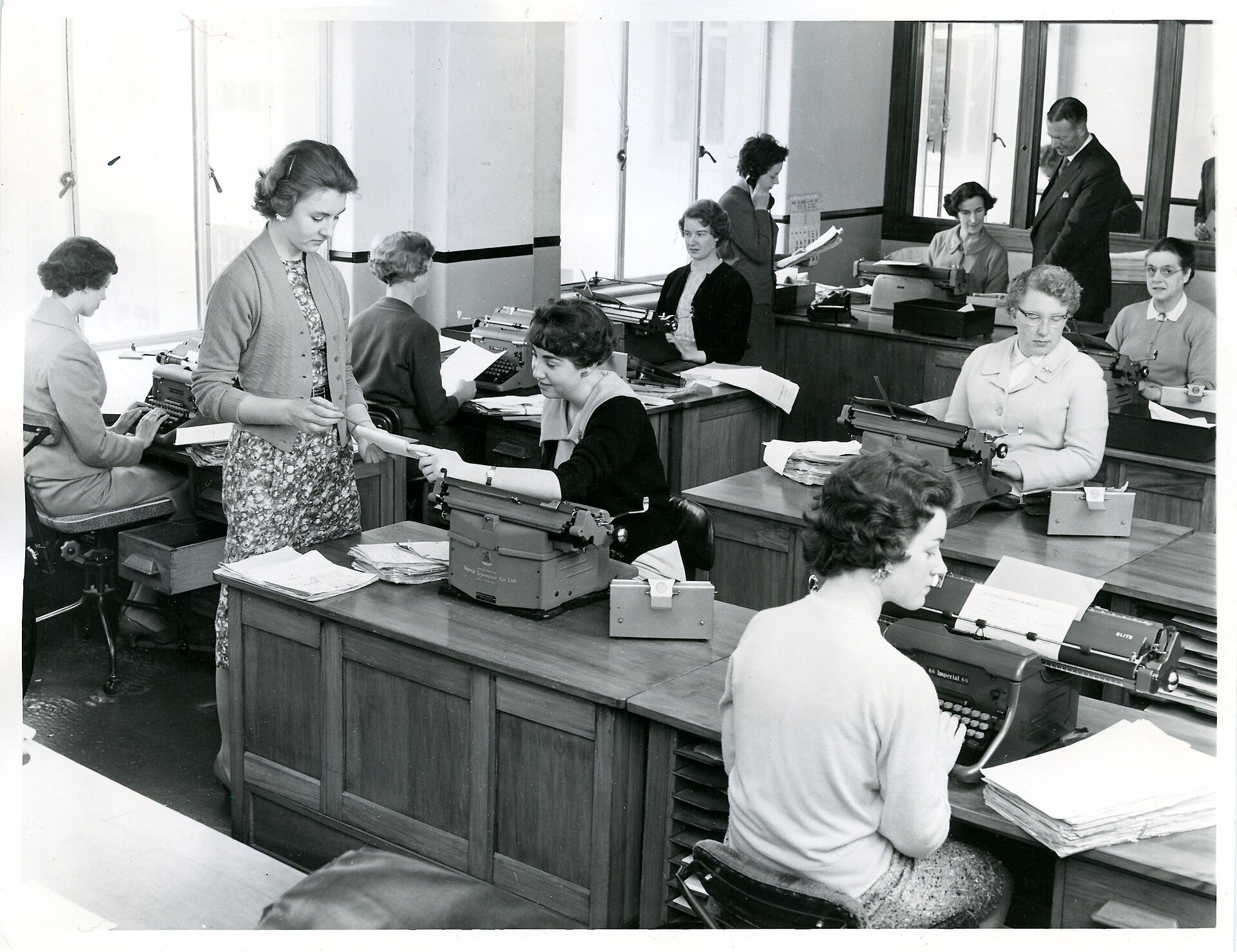
A 1959 office: rows of typists at desks with typewriters and stacks of paper, a supervisor handing over a document.
Head office typists’ room, New Zealand Railways, 1959. The typewriters went. A lot of the copying stayed.

The Friday report

Someone copies forty ticket updates into a client email, one tab at a time, and hopes nothing was missed.

The reminder nobody sent

The documents were due on Tuesday. Everyone assumed someone else had chased them.

Last year’s figures

The rate sheet changed in March. The proposal template didn’t, and a client spotted it first.

How it works

Three stages, from your first call to a workflow that runs every week. You stay in charge of each one.

  1. About a week. First, we watch the task: one or two short sessions, then a written plan.

  2. A few weeks. Then we build it against your real data, and run it beside the person who does the job until they trust the drafts.

  3. Every week after. From then on, it drafts and you approve. Nothing reaches a client without a yes from your side. We keep it running and make it better.

What we build

Four workflows we build most. Pick one and try it: each runs on sample data.

Pulls the week’s tickets from your helpdesk and drafts the client update in your format.

Sample data

IT support report: Example IT Services

Week 42 · 9 tickets opened, 11 closed

Done this week

  • Printer queue fixed on the second floor.
  • VPN access set up for 3 remote staff.
  • Licence renewals logged for November.

Waiting on you

  • Approval for the new Wi-Fi access point.
Draft · waiting for your approval

This page is the demo.

We designed and built everything you’ve scrolled past, with the care we give client workflows. None of it is a template.

Case studies

[Your first case study goes here]

The task, how long it took by hand, what the workflow does now, and what the client said. Short and real.

Want a site and workflows this good for your business?

Book a free 20-minute call

Start small.

Three steps, and you can stop after any of them. We quote after the call, once we’ve seen the task.

Proposal: working with [BRAND NAME]

Three stages · each one optional · pricing on request

  1. Workflow audit

    For finding out whether it’s worth it.

    We sit with the person who does the task, map it end to end, and give you a written plan: what to automate, what to leave alone, and the hours it should save. If it isn’t worth building, we’ll say so.

  2. Fixed-price build

    For one workflow, done properly.

    We build it against your real data, test it beside the person who does the job today, and switch it on only when they’re happy with the drafts. One price, agreed in writing before we start.

    A fixed price per workflow

    Ask about this: Fixed-price build
  3. Monthly plan

    For keeping it right as you change.

    We run it, watch it, fix it and improve it, and add the next workflow when you’re ready. Leave whenever you like with [notice period] notice; you keep everything we built.

Pricing on request. Most people start with the audit.

How we work, and keep your data safe

A person approves everything before it reaches a client. The workflow drafts; your team decides.

Clear contracts. Scope, price, what data we touch and how you leave, written down before we start.

Only the data you allow. Access you grant, can see and can switch off at any time.

How a workflow from us compares with doing the task by hand or in a chat window
Done by handA chat windowA workflow from us
Who checks it before a client sees itWhoever is in a hurryWhoever pasted it in
What data it can seeWhatever is open on screenWhatever someone pastes in
Where the rules liveIn one person’s headIn each person’s prompts
What you signNothingThe tool’s standard terms
When your process changesRetrain the personEveryone rewrites their prompts
If something goes wrongOften found by the clientHard to trace
Who owns itThe person who knows howNo one in particular

Fair questions

What does it cost?

It depends on the task, so we quote after the free call, not before. The audit is a small fixed fee. The build is a fixed price agreed in writing before we start, and the monthly plan is a flat fee. No hourly billing and no surprise invoices.

How soon can we start?

Usually within [two weeks] of the first call. The audit needs one or two short sessions with whoever does the task today; you don’t need to prepare anything beyond that.

Is our data safe?

We only connect to the systems and folders you choose, with access you can see and switch off. We write down exactly what data a workflow touches before we build it. The workflows run on Claude through Anthropic’s business API, and on the call we’ll walk you through what those terms say about how your data is handled.

Can’t we just use ChatGPT or Claude ourselves?

For one-off questions, yes, and you should. The difference is everything around it: pulling the right data in automatically, writing in your format every single week, checking the result, and putting it in front of the right person to approve. A chat window does none of that on its own, and it depends on someone remembering to open it.

What happens if it makes a mistake?

Nothing reaches a client until a person approves it, so a mistake is something you catch in a draft, not something you apologise for. When it does get something wrong, we find out why and change the workflow so it doesn’t happen again. That’s what the monthly plan is for.

Who maintains it?

We do, on the monthly plan: monitoring, fixes, and changes when your process changes. If you’d rather run it yourselves, we hand it over with documentation and it’s yours.

Start with one task.

Book a free 20-minute call. Bring the job you’d most like to stop doing, and we’ll tell you honestly whether it’s worth automating.

Book a free 20-minute call